Invite Friends and Earn Credits
Share your personal link and track invitation records and rewards after a friend redeems a code for the first time
Open the invitation promotion
In research mode, click your account avatar at the lower left and choose “Invite Friends” from the account menu. The legacy tool interface also retains an invitation entry.
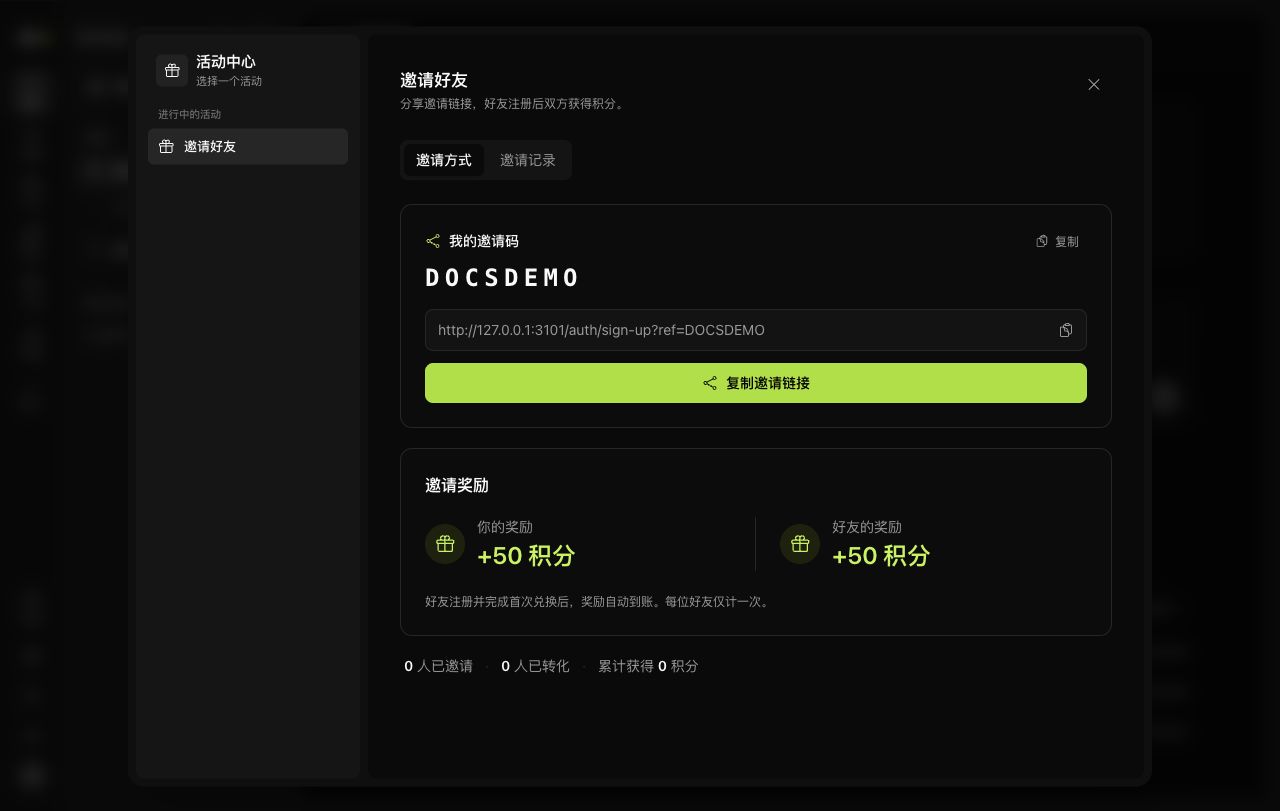
The promotion panel has “How to Invite” and “Invitation Records” tabs:
- “How to Invite” shows your invitation code, a link to copy, and the current reward rules.
- The bottom of the page shows total invitations, converted invitations, and credits earned.
- “Invitation Records” shows each friend's registration and reward status.
How rewards work
Share your invitation link with a friend. If they register through that link and complete their first code redemption, rewards are settled according to the promotion rules. Registration alone does not count as a conversion.
The current panel offers 50 credits to each person, with each friend counted only once. If the promotion changes, the invitation panel and actual reward records take precedence.
The link includes your personal invitation code, for example:
https://ai4scholar.net/auth/sign-up?ref=YOUR_INVITE_CODECopy the complete link from your own account. The documentation screenshot and placeholder example above cannot establish an invitation relationship for you.
Track progress
After a friend registers, check their status in “Invitation Records.” “Pending Redemption” means the reward conditions have not yet been met. Once rewards arrive, verify them in the invitation statistics and credit details.
If your friend did not register through the invitation link, or a record does not match what happened, report it through Community and Contact. Do not try to repair the invitation relationship by registering repeatedly or redeeming codes multiple times.